
Lexile Level Alternatives
Tools To Assess Reading Levels: A Guide For Teachers
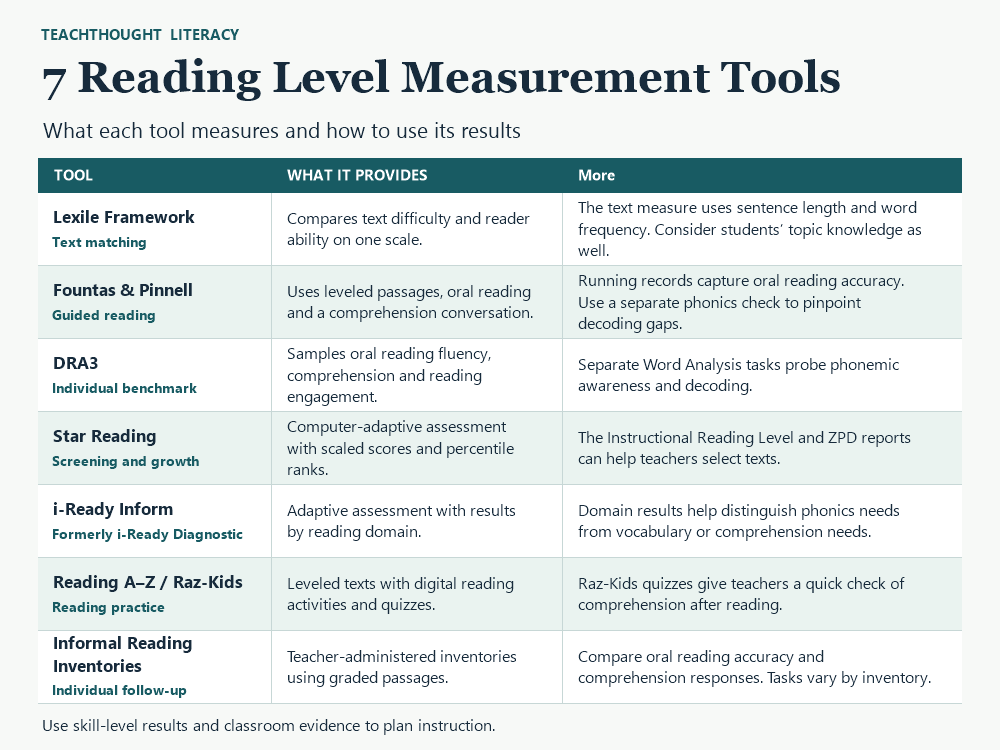
Reading assessment tools measure different things: how accurately a student reads, what the student understands, or how difficult a text is likely to be.
A student who reads a passage accurately may still misunderstand it. Research distinguishes word recognition from the language and knowledge needed for comprehension (Castles et al., 2018). Choose an assessment by the question it needs to answer.
Which tool fits the task?
| Tool | Use it to | Access |
|---|---|---|
| DIBELS 8 | Screen for reading difficulty and monitor skills, K–8 | Free downloadable materials |
| easyCBM | Track reading performance over time, K–8 | Free Lite account; paid editions |
| QRI-7 | Examine reading accuracy and comprehension, beginning readers through high school | Purchased book or eText |
| Star Reading | Assess reading achievement and growth, grades 1–12 | School or district subscription |
| Lexile tools | Look up book measures and estimate passage difficulty | Free book search; Premium Text Analyzer |
| Microsoft Word | Check a document’s formula-based readability | Included in supported Word versions |
Tools for assessing students
1. DIBELS 8th Edition
DIBELS uses short assessments to identify students who may need reading support and measure progress. Its oral reading fluency assessment, used in grades 1–8, requires a student to read a supplied passage aloud for one minute while the teacher marks errors on a separate copy.
Skipped or incorrectly read words count as errors. If a student hesitates for three seconds, the examiner supplies the word and marks it incorrect. A word self-corrected within three seconds counts as correct. The teacher calculates words correct per minute and reading accuracy, then checks the benchmark for the student’s grade and testing period.
The oral reading scores do not directly test understanding of the passage. Fuchs et al. (2001) reviewed evidence supporting oral reading fluency as an indicator of broader reading competence. That research supports the assessment approach; it does not, by itself, validate the current DIBELS edition.
Access: Download student passages, scoring forms, benchmarks, and administration instructions from the University of Oregon’s DIBELS materials page at no cost. Follow the administration guide and do not rehearse assessment passages with students.
2. easyCBM
easyCBM provides reading assessments and graphs showing a student’s scores across testing dates. Tasks include reading words or passages aloud and answering multiple-choice comprehension questions. Available measures depend on grade and account type.
A teacher can administer different passage-reading forms at successive checks and enter the scores to track words correct per minute. Use designated progress-monitoring forms at the same assessment level; changing passage difficulty makes the scores harder to compare.
Access: Create an account through easyCBM’s Teacher Edition. The free Lite tier includes progress-monitoring assessments, individual graphs, and item-level reports. Benchmark assessments and benchmark risk reports require a paid edition. The edition comparison lists which measures each account includes.
3. Qualitative Reading Inventory, Seventh Edition (QRI-7)
QRI-7 is an individually administered assessment with graded word lists and narrative and informational passages from pre-primer through high school. Teachers record oral reading errors and assess understanding through retelling and questions about the passage.
Teachers use the inventory’s criteria to estimate independent, instructional, and frustration levels for the passages assessed. These results describe performance on those tasks; they are not interchangeable with a Lexile measure.
Access: Purchase QRI-7 from Pearson or use a school-owned copy. The manual includes administration, scoring, and technical-development information. Administration requires time for one-to-one reading, comprehension questions, and scoring.
4. Star Reading
Star Reading is a computer-adaptive assessment: question difficulty changes in response to the student’s answers. Students answer questions on a device; Renaissance reports a typical testing time of about 20 minutes.
Reports include a scaled score for tracking performance and a percentile rank for comparison with students in the same grade. Schools use these results to screen students and monitor achievement.
Because Star Reading does not assess oral reading, its results do not show which words a student mispronounces or how the student reads aloud.
Access: Students and teachers sign in through their school’s Renaissance subscription. Star Reading and Star Early Literacy are separate assessments; verify which one the school provides.
Tools for checking text difficulty
5. Lexile Find a Book and Text Analyzer
Find a Book lets teachers look up a book or search by Lexile measure and interest. Use it to identify possible texts when a student already has a Lexile measure from an assessment. Searching by the student’s enrolled grade does not establish that student’s reading ability.
The classroom Text Analyzer accepts prose passages of up to 500 words and returns a 200L-wide range, rather than a single certified measure. It is not designed to produce valid measures for poetry, song lyrics, recipes, or lists.
Access: Both tools are available through the Lexile & Quantile Hub. Find a Book offers limited searches without registration and unlimited searches with a free Basic+ account. Text Analyzer requires Premium access; eligible educators in partner states receive it at no cost after registering with their school or district email address.
6. Microsoft Word readability statistics
Word reports Flesch Reading Ease and Flesch–Kincaid Grade Level, calculated from average sentence length and syllables per word. Teachers can use these statistics to check assignment directions or compare drafts of a passage.
Access: In Word for Microsoft 365 on the Current Channel, select Home → Editor → Document stats. Other supported versions use proofing settings. Microsoft’s readability instructions give the steps by version. The feature is included with supported Word software; it does not assess a student.
Use the result to choose the next check
If a student reads slowly or makes frequent errors, examine word reading more closely. If the student reads accurately but cannot explain the passage, assess comprehension rather than assigning a lower level from speed alone. Record the tool, date, passage or test level, and score so later results can be compared meaningfully.
For instructional follow-up, see TeachThought’s reading strategies, including summarizing and monitoring understanding. Additional assessment resources and literacy resources address classroom checks and reading instruction.
Research references
Castles, A., Rastle, K., & Nation, K. (2018). Ending the reading wars: Reading acquisition from novice to expert. Psychological Science in the Public Interest, 19(1), 5–51. https://doi.org/10.1177/1529100618772271
Fuchs, L. S., Fuchs, D., Hosp, M. K., & Jenkins, J. R. (2001). Oral reading fluency as an indicator of reading competence: A theoretical, empirical, and historical analysis. Scientific Studies of Reading, 5(3), 239–256. https://doi.org/10.1207/S1532799XSSR0503_3